
Kaiser's Heating & Cooling
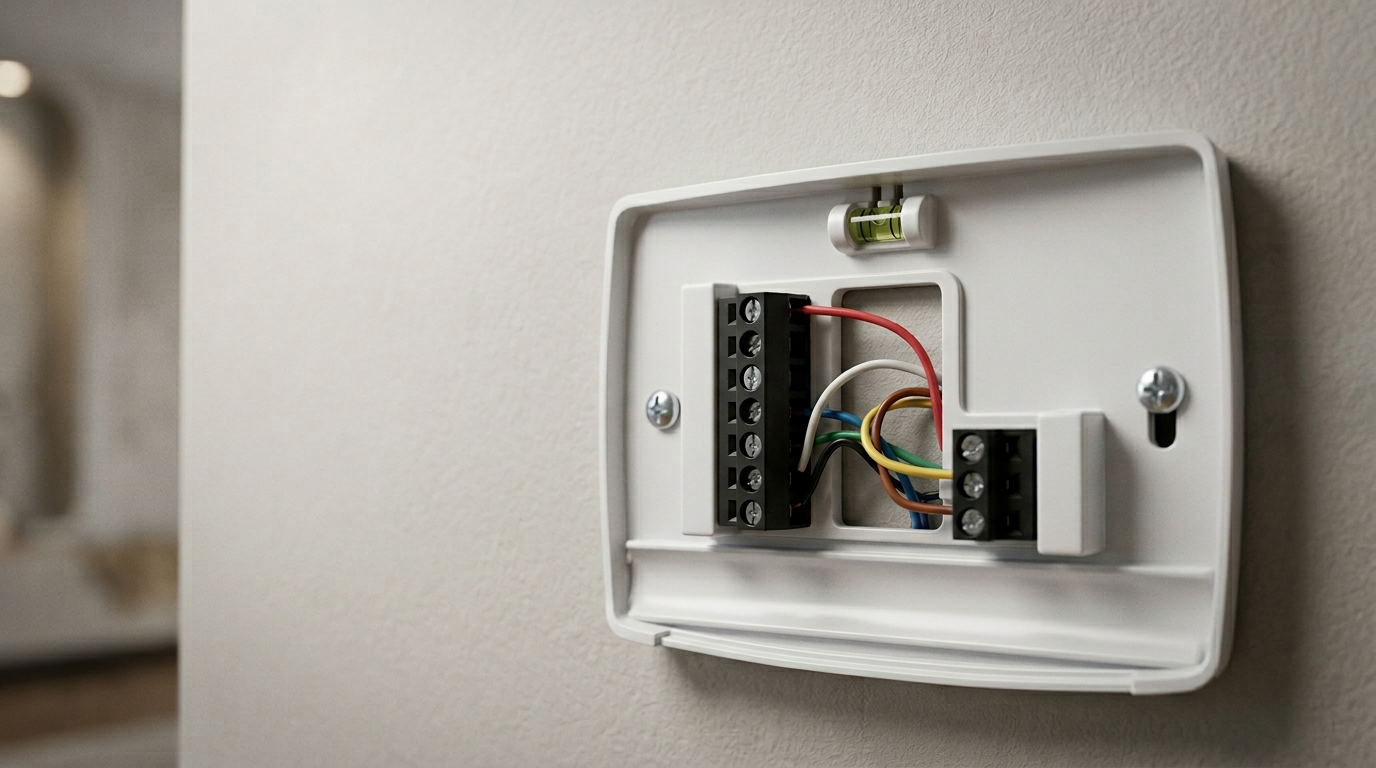
    Smart thermostat wiring baseplate ready for installation
    5 out of 5 stars on Google

    Smart Thermostat Integration in Westland and Metro Detroit

    Most people think it's just swapping out an old thermostat and downloading an app. It's not. Real smart thermostat integration means connecting your new device to your HVAC system, your Wi-Fi network, and sometimes your home's other smart devices so everything actually talks to each other. That's the part most homeowners don't realize until something isn't working right.

    Recent Work

    Photos from real Kaiser's jobs across Metro Detroit.

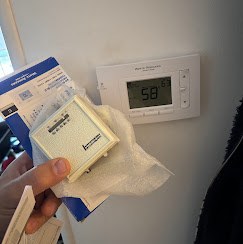
    Thermostat old vs new
    Smart thermostat replacing an older unit
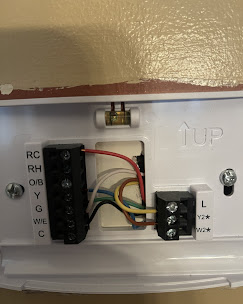
    Thermostat wiring baseplate
    Wiring a smart thermostat baseplate

    Need Smart Thermostat Integration? Get a Free Estimate.

    Skip the search — call now or send your details and we'll respond fast.

    Part of our Heating Contractor services in Westland and Metro Detroit.

    Smart Thermostat Integration in Westland: Upgrade Your Home's Comfort Today

    What Smart Thermostat Integration Involves in Westland Homes

    Most people think it's just swapping out an old thermostat and downloading an app. It's not. Real smart thermostat integration means connecting your new device to your HVAC system, your Wi-Fi network, and sometimes your home's other smart devices so everything actually talks to each other. That's the part most homeowners don't realize until something isn't working right.

    Here's what we typically walk through on a Westland service call. First, we look at your existing wiring. Older homes, especially in neighborhoods like Norwayne, often have only two or four wires running to the thermostat. Many smart models need a common wire, called a C-wire, to stay powered. Without it, you'll get random shutoffs, blank screens, or a thermostat that just won't hold a connection. We see this every week.

    If the C-wire isn't there, we run one. Or we install a power adapter kit behind the wall plate. Either way, it gets done properly so you're not fighting your thermostat six months from now.

    Next comes the HVAC compatibility check. Your furnace might be a single-stage unit, or maybe it's two-stage with a variable-speed blower. The thermostat needs to match what your system can do. Hook up the wrong configuration and your AC might short cycle, your heat pump could lock out, or your fan just runs nonstop. We check every terminal on your control board before we connect a single wire.

    Then there's the network side. We pair the thermostat to your Wi-Fi, walk you through the app, and make sure remote access works from your phone before we leave. If you've got a mesh router or your signal is weak near the hallway where the thermostat sits, we'll troubleshoot that too. No point in having a "smart" device that keeps dropping offline.

    Want to tie it into a voice assistant or a zoning system? We handle that. But most Westland homeowners just want the thing to work reliably and save them money on their energy bills. That's the goal. Not a gadget on the wall. A system that runs the way it should.

    Signs Your Westland Home Is Ready for a Smart Thermostat Upgrade

    Questions About Smart Thermostat Integration?

    Get a free estimate or talk through your options with our team.

    Your energy bill keeps climbing, but nothing's changed. Same routine, same schedule, same house. That's usually the first sign something's off with how your system runs.

    We get calls like this every week from folks in Westland. They'll say the furnace runs fine, the AC seems okay, but the bills don't make sense anymore. The old thermostat is usually the problem. It's just not keeping up.

    Here's what to watch for. If you're constantly adjusting the temperature because rooms feel uneven, that's a big one. Maybe the upstairs is roasting while the basement stays cold. Or you walk past the thermostat and realize it's been set to 72 but your house feels like 65. Older thermostats lose accuracy over time. The sensor drifts, the programming gets clunky, and you end up babysitting it instead of trusting it.

    Another thing we notice with homes in older Westland neighborhoods is outdated wiring paired with basic dial or slider thermostats. These units can't talk to modern HVAC equipment the way they need to. Your system works harder than it should because the thermostat can't make smart decisions about cycling.

    Do you leave for work and forget to turn the heat down? Come home to a house that's been blasting all day? That's money walking out the door. A programmable thermostat helps, sure. But a smart thermostat learns your patterns and adjusts on its own.

    There's also the comfort factor people don't talk about enough. If you've upgraded your furnace or AC in the last few years but kept the old thermostat, you're not getting what you paid for. It's like putting new tires on a car but never aligning them. The equipment can only perform as well as the thing controlling it.

    When choosing a new device, look for models that carry the ENERGY STAR certified smart thermostats designation — these units meet strict efficiency guidelines set by the EPA and are verified to deliver real energy savings.

    So if any of this sounds familiar, your home's telling you something. And it's worth listening.

    How Kaiser's Heating & Cooling Performs Smart Thermostat Integration in Westland

    We don't just swap out your old thermostat and leave. That's not integration. That's a box swap. Real smart thermostat integration means your new device talks to your HVAC system the right way, runs efficiently from day one, and actually saves you money.

    Here's how we handle it. Our technician shows up and starts with your existing wiring. Older homes near Norwayne and throughout Westland often have four-wire setups that weren't built for today's smart thermostats. Some need a C-wire added. Some need an adapter. We figure that out before anything gets mounted on the wall, because guessing leads to short cycling or a thermostat that loses power at 2 a.m.

    Next, we check your HVAC equipment. Got a two-stage furnace? A heat pump with auxiliary strips? Multi-zone dampers? Every one of those needs specific configuration in the thermostat's software. We see this constantly, a homeowner installs a smart thermostat themselves, and it runs fine for a week. Then the aux heat kicks on when it shouldn't, or the second stage never fires. That's because nobody told the thermostat what it's connected to.

    We handle all of that programming on-site. Fan speed delays, compressor lockout temps, humidity control if your system supports it. We set the schedules based on how you actually live, not the factory defaults.

    Then we connect it to your Wi-Fi and walk you through the app on your phone. You'll know how to adjust temps remotely, set up geofencing so the system backs off when nobody's home, and read your energy reports. Most folks in Westland are surprised how simple it is once someone shows them in person.

    Before we leave, we run a full heating and cooling cycle. We watch the system respond to the thermostat's calls, verify the fan shuts off when it should, and confirm the app reflects what's actually happening at the unit. A DIY install almost always skips this step entirely.

    Our team's been licensed and doing HVAC work across Westland for years. We treat every install like it's our own house. That means no loose wires tucked behind drywall, no skipped steps, and no "it should work" on the way out the door.

    Preparing Your Westland Home for a Smart Thermostat Installation

    Before we show up, there's a handful of things you can do to make the whole process smoother. None of it's complicated. But it saves time and helps us get your system running right the first visit.

    First, find your current thermostat. Look at how it's mounted and peek behind the cover plate if you can. We need to know how many wires are connected back there. Most homes in Westland have four or five wires, which works fine. But older homes near the Norwayne area sometimes only have two, and that changes the game a bit. Snap a quick photo and send it to us ahead of time. We'll know exactly what we're walking into.

    Next, check your breaker panel. You'll want to know which breaker controls your HVAC system. Label it if it's not already marked. We always kill the power before touching any wiring, and knowing the right breaker up front keeps things moving. Plenty of homeowners aren't sure which one it is. That's totally normal.

    Clear the area around your thermostat. Move any furniture, picture frames, or shelves that block access to the wall. We need about two feet of workspace on each side. If your thermostat sits in a tight hallway, just pull anything out of the way so we're not bumping into things.

    Got pets? Keep them in another room during the install. One curious dog and an open toolbox don't mix well.

    Here's something most people skip. Make sure your Wi-Fi network is working and you know your password. Your smart thermostat connects to your home network during setup. Weak signal at the thermostat location? We see this a lot in Westland homes with the router tucked away in a basement. If you're not sure about your signal strength, hold your phone next to the thermostat spot and check how many bars you get. If it's one bar or less, we can talk about options.

    Also, have your HVAC filter checked or replaced recently. A clogged filter puts stress on the system, and that can throw off the readings your new thermostat relies on. Clean filter, clean start.

    Want us to walk you through any of this before your appointment? Give us a call. We're happy to help you prep so installation day goes smoothly.

    Verifying Your Smart Thermostat Works Correctly After Integration

    Installation is only half the job. The part most people skip? Actually testing everything before the technician leaves.

    We run through a full verification process on every smart thermostat we install in Westland. We cycle your heating on, let it run, then switch to cooling. We watch the system respond in real time. If there's a delay that shouldn't be there, we catch it right then. Not three weeks later when you're freezing at 2 a.m.

    Here's what we're checking. First, does the thermostat actually talk to your HVAC equipment? Sounds basic, but we see wiring issues on older homes near Norwayne all the time. A loose C-wire connection can make the screen light up just fine while the furnace ignores every command. So we verify the signal path from thermostat to equipment, and every stage of heating and cooling gets triggered manually.

    Then we confirm your Wi-Fi connection is solid. A weak signal means your phone app won't work, your schedules won't sync, and you lose half the reason you wanted a smart thermostat in the first place. We test the connection strength right at the thermostat location. If it's borderline, we'll tell you straight up.

    Sensor readings need a quick calibration check too. We compare the thermostat's temperature reading against an independent thermometer. A two or three degree difference might not sound like much, but it means your system runs longer than it should, costing you money every month.

    We also walk you through the app before we leave. You'll know how to adjust schedules, set hold temperatures, and check your energy reports. According to the Department of Energy, proper thermostat use can cut heating and cooling costs by around 10 percent annually. But that only happens if you actually know how to use the thing.

    Want us to double-check an install someone else did? Give us a call. We're happy to look at it.

    Ready to Request an Estimate?

    Call now or send us your details — over 20 years of on-the-job experience serving Westland and Metro Detroit.

    Frequently Asked Questions

    Ready to Get Started?

    Talk with our team about your smart thermostat integration project. Over 20 years of on-the-job experience serving Westland and Metro Detroit.

    Related Services

    Call NowRequest Estimate